Holax - Multipurpose Hikashop eCommerce Template CMS Themes Theme


Holax is fully hand crafted, simple, flat and clean with huge features template which build by Warp 7.3.x Framework. Holax is the best product we ever did with two powerful extension Hikashop (for shopping cart facility) and Shortcode Ultimate (for manage content by super easy way).
It’s have lot’s of possibilities you can easily change layout from admin panel even you can change any part of website with live preview. So we hope you can build your site so much easy way without any hassle.

Why you Choose This Template?
- Joomla 3.7.x Ready
- Powerful Warp 7.3.x Framework
- Smart Responsive Layout (smartly handle the mobile part)
- Creative and Modern Flat Design, lots of possibilities
- Fully compatible for all major browsers such as Firefox, Safari, Chrome, Vivaldi, Internet Explorer 9+
- Built by HTML5, CSS3, LESS CSS
- Built in Gzip Compress and Data URI function for faster site loading
- Revolution slider included so you save $25
- Dual Typography UIKIT and bootstrap based
3 Header style and 5 Menu style included, you can combine with any of them.
5 Preset with Unlimited Color variation possibilities (choose your color piece by piece from live customizer so no binding with only 5 color)
72+ Module Positions, 8 Module Variation with 8 type title combination and you can add 360+ icon as you need also subtitle possible also many common styling included (such as text align, padding reset, margin reset, subtitle, icon etc)
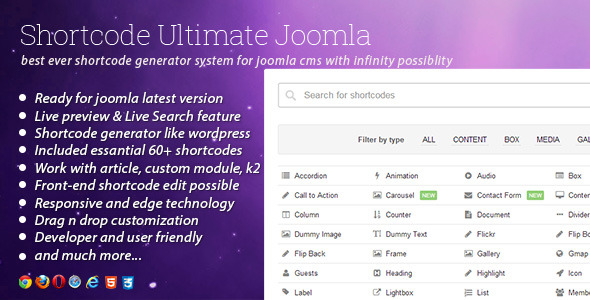
Shortcode Ultimate for generating shortcode like wordpress, that you help to manage your content easily, it’s included 90+ awesome shortcode. please check this plugin for more details about it.
570+ Font type icon for support any size even retina display also you can call them in module title/inline icon/text block where you want.
K2 Styling with Custom Templating for better blogging.- All Installed Extensions (Components, Modules, Plugin) are included in the quick start package.
Well Documented with online documentation site and also have dedicated support system with active team.- Translation Ready and Multilingual support and also support RTL features.
- and much more, i think it’s better if you please check the demo site fully.
Template Included Shortcode Ultimate Plugin

Sources and Credits
Warp Framework
http://www.yootheme.com/themes/warp-framework
Shortcode Ultimate Plugin
http://codecanyon.net/item/shortcode-ultimate-plugin-for-joomla/7807980
K2 Component
http://getk2.org/
HikaShop eCommerce Solution
http://www.hikashop.com/

Version Change-log [Last Update: 09 July 2017]
== Version 1.6.0 ==

+ Updated Joomla 3.7.3
# Hikashop css fixed
^ Hikashop component override has droped
# minor css and javascript fixed
[NOTE: some design has been changed for better usability and override issue in hikashop now we drop the override fully for component part but design keep almost same except add to cart + wishlist because it's not possible to design without override but override caused some major problem in shopping functionality for that reason we decide to drop it. we are very sorry for this major changes in hikashop style]

== Version 1.5.3 ==

+ Joomla 3.7.0 support added
^ Updated Warp Framework 7.3.33
# Hikashop minor style issue fixed
^ Updated All extensions in quick-start package
^ Latest shortcode plugin (3.7.1) included
# minor css and javascript fixed

== Version 1.5.2 ==

+ Joomla 3.6.5 support added
^ Updated Warp Framework 7.3.32
^ Updated hikashop 3.0
^ Updated All extensions in quickstart package
^ Latest shortcode plugin included
# minor css and javascript fixed

== Version 1.5.1 ==

+ Joomla 3.6.4 support added
^ Updated Warp Framework 7.3.30
^ Shortcode Ultimate Plugin added latest version
^ Minor changes in Hikashop override
# Minor css and javascript fixed

== Version 1.5.0 ==

+ Joomla 3.6.2 Ready
^ Warp Framework updated to 7.3.28
^ Shortcode Ultimate plugin updated to 3.2.1
^ Quick start package updated to latest joomla version
^ Hikashop override updated + fixed some minor issue
+ Mailchimp style added
# minor css and javascript fixed

== Version 1.4.1 ==

^ Warp framework updated to 7.3.23
^ K2 lightbox and social share fixed
# Hikashop out of stock and notify me button and saved cart star/delete option fixed
# Product listing height problem fixed

== Version 1.4.0 ==

^ Compatible with latest joomla 3.5
^ Quickstart package updated to latest joomla version 3.5
^ Warp framework updated to 7.3.21
^ Shortcode Ultimate Plugin updated to 3.0.2
^ K2 Latest version 2.7.0 updated + tested
# Hikashop details page image ordering problem fixed
# Hikashop builtin social share placement fixed
# Minor javascript and css style fixed

== Version 1.3.0 ==

^ Warp framework updated to 7.3.20
^ Hikashop layout update
^ Shortcode Ultimate Updated to latest version of 3.0.1
^ Joomla Updated and checked to latest version
# Some minor css and script fixed

== Version 1.2.0 ==

^ Warp framework updated to 7.3.13
# Hikashop sidebar problem fixed
^ Quickstart package updated to joomla 3.4.5
^ All extension updated with latest version
# minor css and script improved

== Version 1.1.0 ==

^ Warp framework updated to 7.3.10
^ minor css and script improved

== Version 1.0.1 ==

# template installation problem fixed
^ minor css updated

== Version 1.0.0 ==

Initial release
NB: Stock photos and hikashop business version NOT included in this template package you need them buy separately. We used them demonstration purpose only.


Hi, HikaShop Business update is available, how can we download or upgrade? In Joomla getting a message that “We do not provide auto-updates, please download the latest version from HikaShop and update.” So as a user how can I download HikaShop Business and update my HikaShop Component.
ReplyDeleteSorry for late reply, we are on vacation. you need to purchase a license for use business version you can use starter version if you want free download. we use it for demonstration purpose.
ReplyDeleteWhen trying to install Hikashop that is included with your template I get the following error: JLIB_FILESYSTEM_ERROR_WARNFS_ERR03
ReplyDeleteAny ideas on how to fix this?
Sorry for late reply, we are on vacation. can you install the latest version by downloading from hikashop site?
ReplyDeleteCannot use the Save and Save & Close buttons in the template manager so I cannot make any changes to my site. This is a known bug with the newest version of Joomla. This bug has been fixed with the latest version of Warp 7.3.7. So how can I get the latest version of Warp?
ReplyDeleteIf you upgrade to Joomla 3.4.3 you will not be able to modify this template unless you upgrade to Warp Framework 7.3.7.
ReplyDeleteI downloaded the framework from here: http://www.joomlaplates.com/support/documentation/update-the-warp-framework
and followed the instructions for updating the framework (just copy and replace).
Now I am able to make modifications to the template.
Sorry for late reply, we are on vacation. Thanks for solved the problem. if you have more issue don’t hesitate to tell us.
ReplyDeleteHi, are the extensions like components, modules and plugins also in separate folders? There is a quick start package?
ReplyDeleteHello, All extension and quickstart package included so you can start your site both way.
ReplyDeleteI have support questions but your ticket system is not working. Please advise.
ReplyDeleteHello, can you try it now?
ReplyDeleteDoes this template work with RokSprocket? And does it have the same excellent styling for RokSproket as your other template – Effortless?
ReplyDeleteYes it’s works with rocksprocket but style not included sorry for it
ReplyDeleteHello,
ReplyDeleteIs there a way to add a background image in the template settings? Or do I have to add this through CSS?
Please let me know. Thanks in advance!
Hello, you can easily add background to any section from template admin. please look at templates > holax > options > Layouts tabs
ReplyDeleteHello, I went to where you said to go. Looks like you can only add background to certain grid sections? Is there a way to add a background to the entire site? For example, when I am in the boxed layout can I put something in the background? Please advise
ReplyDeleteNevermind. I just found it. Thank you!
ReplyDeleteOk thanks
ReplyDeleteHi
ReplyDeleteI really think you need to get better with your support and updating your product.
There is a problem with Your Holax template and the latest joomla. Please update your template and also please get back when one uses your support system.
Best regards
Martin
Thanks for your feedback, i am on the way. you will get an update on monday
ReplyDeleteIs the update coming soon?
ReplyDeletewaiting for approve
ReplyDeletewhat is taking so long? My project is standing still since the template does not work?
ReplyDeleteSorry for delaying but you can continue your work, when approve it you will get an email.
ReplyDeleteHello,
ReplyDeleteI am working heavily in the shop section of my website right now and have realized that the sidebars show up at the bottom of the page.
For example, http://bdthemes.net/demo/?product=holax
The sidebar is being pushed to the bottom of the page and not being kept to the side where it should be. Is there a way to fix this? Please advise. Thank you in advance!
Hi, sorry for late reply. Did you update your template with latest version template? if not please update it so your problem will be solved.
ReplyDeleteHikaShop Paypal payment plugin is not working in your website with Joomla 3.4.4, previously it was working fine but now its not and giving error which is here I know i should have send this at support but its very clear and common so thought to let you know here.
ReplyDeleteUnknown column ‘order_currency_info’ in ‘field list’ SQL=INSERT IGNORE INTO `gw8b3_hikashop_order` ( `order_user_id`,`order_status`,`order_shipping_address_id`,`order_billing_address_id`,`order_currency_id`,`order_currency_info`,`order_type`,`order_full_price`,`order_tax_info`,`order_shipping_price`,`order_shipping_tax`,`order_shipping_params`,`order_payment_price`,`order_discount_tax`,`order_discount_price`,`order_shipping_id`,`order_shipping_method`,`order_payment_id`,`order_payment_method`,`order_created`,`order_ip`,`order_modified` ) VALUES ( ‘2’,’created’,’2’,’2’,’5’,’O:8:\stdClass\’ )
Hello, can you install the latest version of hikashop? i hope so your problem will be fixed.
ReplyDeleteGot a solution from Hika Shop direct so sharing for others. Just to click on “Check Database” button in Hikashop and it will be fixed.
ReplyDeleteOne question for you, how can we update Hika shop?
Hello, Thanks for your feedback. you can easily update it by download and install it from hikashop website.
ReplyDeleteBUYER BEWARE !!!
ReplyDeleteI bought three templates from Envato, and BD themes is truly the worst template builders I dealt with so far on this site. Support , if they ever answer, just gives you the run around, documentation is not up-to-date, certain Hikashop standard pages aren’t styled and the Warp framework in inferior to others, to be polite.
I really wish I hadn’t chosen this template. I’m going back to making my templates and will never buy another again, due to this experience.
Are you happy with latest update? if not so please send refund request to envato they will refund you.
ReplyDeleteAs for the update, according to the Change log and to demo site, no I don’t see of the changes I needed.
ReplyDeleteAs for the refund, that isn’t an option at this point, as I have put way to much work into it to start over again.
Hi, can you tell me what’s your problem so we can fix that? please send a support with details.
ReplyDeleteAbout refund: i told you refund because if think i purchase wrong product i don’t want loss my money so you can refund it
Ok, I decided to do it here as if i submit a ticket, I probably won’t get an answer, until the end of November.
ReplyDelete1)The worst is menu dropdown.
a) Put too many subcategories is goes completely off page.(c.f: homepage style 2 on demo site and on other styles too). It woud be nice if it could at least open centered.
b) It only looks nice if have the exact same amount of subcategories. So if you have 10 subcategories in 1 column, and 5 in another, and 2 in another and 1 in another, it creates 4 columns with a lot wasted space. They don’t wrap in any way and you can’t even put a module in there to try and fill some of it up.
Basically, there’s no control over the menu, except for a few variations of the same menu, which doesn’t change the problems I mentioned above.
2) Category listing page hasn’t been styled.
The standard Hikashop category page wasn’t style and isn’t showing on your demo site either(?). Usually when you buy a styled component that comes with a template, all of the components standard page layouts are styled.
And no I didn’t buy the wrong product, just the wrong template & framework. I wanted a Hikashop template, fully loaded and ready to go, but that isn’t what I got.
Hello, Actually we design this template for small shop/store such as 10-50 products shop. it’s not included mega menu that you wanted. category style included but not included sub category style. you are right you choose wrong template for your shop. we are sorry for it. but need to discussed before buy the template for confirm that feature you wanted. you can send a support ticket to envato for refund money.
ReplyDeleteIt doesn’t make difference, you designed a menu that just doesn’t work well, that’s it, plain and simple. Then you didn’t bother to make the Hikashop filter responsive either, yet another thing you missed, but that’s ok, right, cuz it’s a shop that only suppose to display 10 ~ 50 products !
ReplyDeleteExcuses, excuses, brushing off and lot more unexpected surprises is all you can get form this theme designer. So sad you aren’t into supplying good customer service, like JoomFX did.
SO, for those who are reading this, REMEMBER, when buying any template, what you see is what you get ! Errors and all ! And because it might tied into some sub par, poor documented framework, you won’t be able to easily change/fix it.
Once this site is done, I’m going to assume the cost(my time & the cost of this template) and remake the site with my own responsive template; as this experience has shown me that buying templates isn’t really a shortcut, even if you only want to make a few modifications or fix the bugs or dare to update something until you sure the framework can handle it. What a waste of time.
Thx BD.
How do you get article to show on homepage? Articles show on all pages except for the homepage.
ReplyDeleteHello, Please go to template settings > layouts tab > Select your Homepage from layout dropdown then Unchecked the “Hide system output.” from middle of the page.
ReplyDelete