Culinier - Food & Recipe WordPress Theme
Themeforest Culinier - Food & Recipe WordPress Theme WordPress Theme


Culinier – Recipe & Food Wordpress Theme is responsive, retina-ready, modern recipes, restaurant, café & blog WordPress theme.
Culinier has very power recipe management tools that build with a lot of options such as ingredients, directions, nutrition, advanced search/filter and front-end submissions. It helps you build your own community recipe site quickly or even create restaurant website with drag & drop shortcodes.
Customer Says:

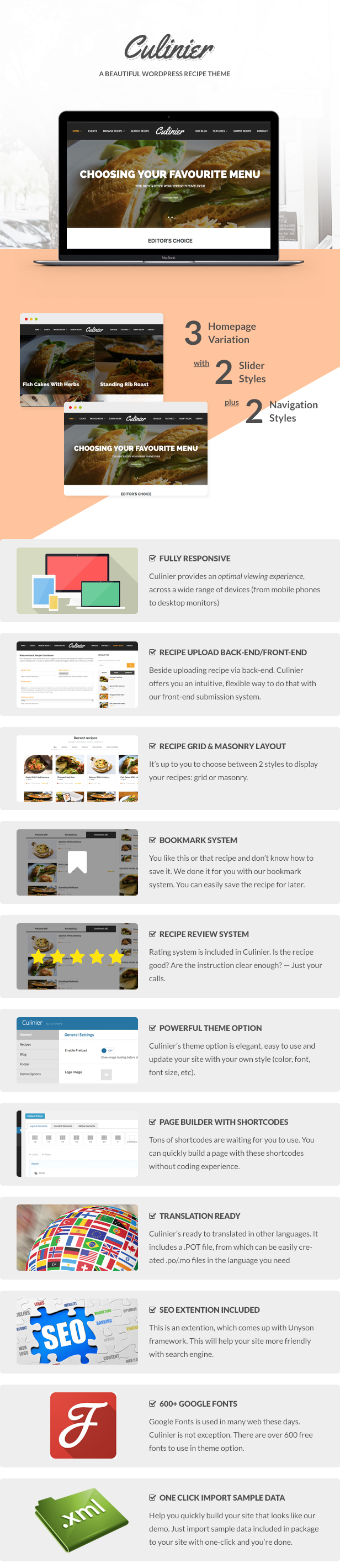
Theme Features:
- 100% Responsive Layout Design
- Event Extension
- Menu icon/ Mega Menu
- Valid HTML5 and CSS3
- Custom Widgets
- Tons of shortcodes built-in with Page Builder
- Smooth scroll
- Contact Form 7
- Google fonts: It support 700+ Google font and do not worry about if any new font added in Google font library, just copy the font name and paste it in the text field in the theme option
- Translation Ready
- One-Click Import Sample Data
- Feature page:
- Slide header
- Event page
- Submission Frontend
- Gallery masonry
- Menu/Recipe Grid
- Menu/Recipe detail
- Event & Event detail page
- Blog page
- Cross-browser compatibility (IE9+
- Bootstrap 3.1.1
- Google Web Fonts
- jQuery isotope
- Lightbox
- Well commented code.
- Free update
All images are not be included in purchased package. Just for demo purpose.
Change Log:
Version 1.1.1(14/06/17)
- Fix problem with textblock shortcode
- Change recipe slug
Version 1.1(13/06/16)
- fixed: parralax on Mobile
- updated: translation
Version 1.0.9(24/02/16)
- fixed stick & Mega Menu
Version 1.0.8(11/12/15)
- Update Demo Content
- Fixed Gallery shortcode
Version 1.0.7(28/08/15)
- Fix bug with WP 4.3
Version 1.0.6(13/07/15)
- add custom css to Theme Options
- optimize search-recipe functions
Version 1.0.5(10/07/15)
- add slider speed option to nivo-slider
- set full width if using page builder in default page
- add color text to some options: section header, recipe header
- change breadcrumb background image in category page
- add limit number event post option in event shortcode
Version 1.0.4(23/05/15)
- update Documentation: add translation, upgrade theme
- update TGM plugin to 2.5.0
- remove HT-Styling
- add styling to Theme Options
Version 1.0.3(10/05/15)
- fix author page
- add title, description of Recipe page to Theme Option
- fix error when enable preload
Version 1.0.2
add Styling extension: change color, font, background color,...
fix some minor bugs
Version 1.0.1
add .pot file for translation support
Version 1.0.
First Initial


We have the template for one of our customers but are having issues with the menu, it’s like it’s being pushed to the background whenever an user scrolls down. It’s even worse on mobile were the header of the home ends up on top of the hamburger menu.
ReplyDeletePlease advise.
Hi, Could you create a ticket and give me the screenshot of your issue? Our developer will response you asap.
ReplyDeleteThanks!
Hi, Is it possible to change the properties of the submit form? For example; Can I change ‘Cooking method’ into something else and change the three options for it? Also, Can I change pre-time and cooking time? And maybe add a slider?
ReplyDeleteHello! To change that options I think you could hire a developer to edit it via the child theme.
ReplyDeleteThanks!
Does this support right to left (RTL) display for a language like Arabic?
ReplyDeleteHi! Unfortunately, it doesn’t support RTL yet.
ReplyDeleteThanks!
Thanks for your reply. I really hope you can support RTL in the near future. Your theme is amazing indeed.
ReplyDeleteHey there haintheme team!
ReplyDeleteI translated the theme in Romanian and now the colored dot near the recipe difficulty level disappeared. How should I make it appear even if the theme is translated?
Thank you!
Hi! there’re no way to keep the colored dot. You need to set the new color by using custom css bellow
ReplyDelete.hs-recipes.grid .entry .meta-difficulty.hard:before, .hs-recipes.grid .we .meta-difficulty.hard:before {
background: #e67e22;
}
Before adding this css, you need to change ‘hard’ value to your new value.
Thanks!
Hi again! I’m using Visual Composer in combination with your theme because I like it a lot better than the Unyson framework. Especially because VC lets you create custom (masonry) grids with filter buttons. Because of this I like to know what the ‘field key name’ is of the post rating. This is the php code from the single.php file:
ReplyDelete<?php if(function_exists(‘fw_ext_feedback_stars_get_post_rating’)) { $rating = fw_ext_feedback_stars_get_post_rating(); for ($i = 1; $i <= 5; $i++) { $voted = ($i <= round($rating[‘average’])) ? ’ rated’ : ’’; echo ‘’; } } ?>
I’ve tried ‘entry-rate’, ‘post_rating’, ‘rating’, and ‘average’ but none of them seem to work. Thank you for your help.
I would appreciate it if you could also tell the field key names of the serving and total preparation time.
Hi! The rating and serving don’t be saved like default wordpress meta field. If you want to get the value, you can use our function as fw_ext_feedbac_starts_get_post_rating and fw_get_db_post_option( $post->ID, ‘serving’, array() ) for example. These functions still work in Visual shortocde as long as Unyson plugin is activated.
ReplyDeleteThanks!
Are the recipes in this theme using the valid schema.org Markup – Work with Google Rich Snippets etc. (SEO Optimized)
ReplyDeleteHi! Sorry, they are not using valid schema Markup.
ReplyDeleteThanks!